
The Avee Download Tool for the BlueLink MkII is here!
Updating the Avee BlueLink firmware
To be able to download new firmware to the Avee BlueLink via USB – you will need the Avee Download Tool (ADT for short).
The Avee Download Tool is currently available for Windows only (up to version 10) and can be downloaded from here: Avee Download Tool Version 1.0 – May 29th 2023.
For those of you that are on Macs: Yes – we are working on it!
The USB driver
Internally the BlueLink is using the CP2102N USB interface chip from Silicon Labs, so please go to this page to download the driver if this is not already installed on your computer: https://www.silabs.com/developers/usb-to-uart-bridge-vcp-drivers?tab=downloads. Download the 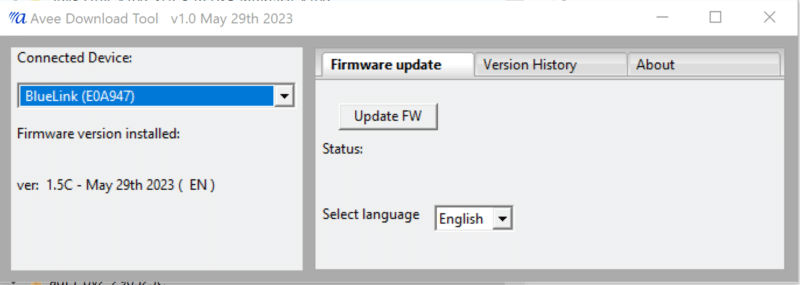
.
- In the Connected Device field on the left side of the panel, you will see which device is connected to the ADT.
Here you will also see which firmware is installed on your BlueLink, and which spoken language is installed.
In the example shown, firmware version 1.5C is installed and English is the spoken language from the BlueLink.
. - In the Version History tab you will find a list of changes made to the Avee BlueLink versions.
From version 1.0 to the latest version available.
Please note that the User Guide will be available for one specific firmware.
. - In the About tab, you will find information on the version of the Avee Downloader.
.
Firmware upgrades and the documents shown in the tabs are downloaded from our internet area automatically.
.
Do NOT (meaning DO NOT) disconnect the BlueLink while downloading new firmware.
Per May 29th 2023 we do only support the English and French languages, however: Spanish and German will be supported in a short time.
.
After the download is finished, the ADT will show the new firmware version being installed in the Firmware version field.
The Bose® QuietComfort® SE
We are happy to inform you that the Avee45 fitting the Bose® QC45 also fits the ‘new’ Bose® Quietcomfort® SE.
We do not see or hear any difference between the QC45 and the QC SE – apart from that the QC SE comes with a cheap-looking headset case.:
- The SE looks exactly like a QC45.
We can not tell the difference, and we do kind of know what to look for… - The excellent user interface is like on the QC45
- It has the same weight as the QC45
- The sound quality on the SE is similar to the QC45.
- It works like a breeze with the Avee.
- When testing the ANR – we find it to be like the QC45.
Simply very good. - Comfortable like a QC45.
.
So; us humble folks at Avee have been trying our best to twist our tiny brains: why is Bose releasing a product that is exactly (TBC (to be confirmed)) similar to a product they have already released?
The minds of Bose®, the Good Lord®, and Sales People are for sure going in mysterious directions.
Anyway: there are some incredibly good Black Friday® offers on the QC SE: Less than USD/EUR 199 (even including the 25% Norwegian VAT) and that is a very (extremely very) good price for a product like this!
Perfect for flying: go for it and say thank you to Bose®!!
Updated: Comparing our headsets: recreational headsets vs ‘single purpose’ pilot headsets
Comparing our headsets: recreational headsets vs ‘single purpose’ pilot headsets
For a long period of time, we have had the idea to do a test of the state-of-the-art ANR (acoustic noise cancellation) headsets we are supporting, and finally, we have found the time to do this.
At the moment, we have Avee aviation microphones fitting a relatively large range of high-end Bose® and Sony® recreational headsets.
Development from these two manufacturers is not standing still: new headsets are added regularly, and we do our best to support their new products as fast as we can.
Customer questions
Many customers ask the following questions:
- how do the recreational headsets perform compared with the ‘pilots headsets’?
- which recreational headset is the best for aircraft use – and how can I choose the right one?
- And last but absolutely not least: how do the recreational headsets compare with ‘the industry standard’: the Bose® A20 ?
.
In this article, we will give you the answers – and you might be surpriced!
What we are testing
The purposes of the aviation headset are to reduce cockpit noise as much as possible to create a comfortable working environment and to give you quality radio and intercom capabilities.
In this test, we are checking out the following parameters on the headsets:
Passive noise cancellation
The passive noise reduction is the reduction of noise the headset itselves provides with no headset electronics switched on.
Sound level is measured in decibels (dB) and you can read more about it here https://soundear.com/decibel-scale/.
-
- How much reduction in noise level is the headset giving when the ANR is switched off?
In a normal situation, the ANR is switched on when the headset is used.
However; passive noise cancellation is important in case the ANR stops working due to for example a low battery.
.
- How much reduction in noise level is the headset giving when the ANR is switched off?
Active noise cancellation
The active noise reduction or ANR, is the redution in noise the electronics built into the headset gives.
-
- How much reduction in noise level is the headset giving when the ANR is switched on?
For many pilots, the reduction in the noise level / ANR effectiveness is the most important feature of the headset.
.
- How much reduction in noise level is the headset giving when the ANR is switched on?
Weight and ear squeeze force
Providing a reasonable amount of comfort, it is essential that the weight of the headset is as low as possible.
The squeeze or clamp force should also be as low as possible.
-
- What is the weight of the headset?
- Clearly, a light headset will feel more comfortable to wear after some hours of use.
- And a headset with low ear squeeze force will feel more comfortable to wear than a headset with high squeeze force.
.
How we have tested
When setting up a test like this to get reliable results, it is crucial to test the headsets under precisely the same conditions:
- To get these reliable results, we have set up the tests in lab conditions and not in a real aircraft.
- The test is based on audio stereo recordings in a DA40-D (diesel piston engine) and in a B737 jet during cruise.
- The sound level is measured at 95dB for the DA40 and 85dB for the B737.
Sound levels (or noise level) will of course vary with power setting and which phase of the flight we are in (takeoff, cruise, descend etc). - The audio is played back to the headset in a lab environment creating ‘an artificial cocpit’ at a sound level of 90dB.
- On the tested headset, we have installed noise measurement microphones in both left and right earcup.
- The measurements from these microphones are the base for the headset noise tests.
.
| Headset type | Headset weight with microphone | Headset weight with microphone and cable | Complete headset with cable & BlueLink / Bluetooth | Clamp force | Passive noise cancelling (90db initally) | ANR noise cancelling (90db initally) |
|---|---|---|---|---|---|---|
| Bose® QC35 | 259 grams | 308 grams | 353 grams | 265 grams | 86 dB | 67 dB |
| Bose® QC45 | 258 grams | 307 grams | 352 grams | 260 grams | 86 dB | 65 dB |
| Bose® 700 | 282 grams | 331 grams | 376 grams | 275 grams | 85 dB | 64 dB |
| Sony® XM3 | 278 grams | 327 grams | 372 grams | 260 grams | 87 dB | 69 dB |
| Sony® XM4 | 276 grams | 325 grams | 370 grams | 255 grams | 87 dB | 69 dB |
| Sony® XM5 | 273 grams | 322 grams | 367 grams | 255 grams | 87 dB | 66 dB |
| Bose® A20 | 382 grams | (not applicable) | 789 grams | 586 grams | 86 dB | 67 dB |
How to read the test results
Read the table according to the following:
- In the first column we have the headset type being tested.
. - The second column shows the headset’s weight (including the microphone) on your head. We aim for less weight.
. - Column three shows the headset’s weight, including the (Avee) microphone and a 165cm cable with GA connectors.
For the Avee solution (without the BlueLink), this represent the weight you have to carry in your bag.
This column is not applicable to the A20.
. - Column four shows the total weight of the headset product; what you have to carry in your bag.
For the Avee solution this column also include the BlueLink.
The Avee aviation microphones can be delivered without the BlueLink controller; the Bose® A20 is delivered with the handheld controller always present.
. - The Clamping force column shows the combined force from the headset pressing on your ears.
. - The Passive noise canceling column shows how much the headset is reducing cockpit noise when the ANR is switched off.
The lower the value – the better the headset protects your ears.
. - The ANR noise canceling column shows the measured noise level in the headset when the ANR is switched on.
Again; the lower the value – the better the headset protects your ears.
.
ANR conclusion – Bose®
We see from these measurements that the ANR/noise cancellation in the Bose® headsets are fairly stable: they are all at almost the same level.
The Bose® 700 has excellent noise reduction capabilities, while the QC35 is at a slightly higher level (64 dB for the B700 vs 67 dB for the QC35).
The A20 has OK ANR capabilities but is not as good as the QC45 and B700.
The A20 does have good passive noise reduction capabilities, but even here, the B700 and the QCx5 are at the same level or better.
Somewhat surpricing.
ANR conclusion – Sony®
The Sony® XM headsets are somewhat in the same range as the Bose® when it comes to the ANR.
We included the new XM5 in this test, and we can see a clear improvement to 24dB (90dB – 66dB) on this new model compared to the older XM4 & XM3.
We will support the XM5 in a couple of months.
Comfort conclusions
It is challenging to say which recreational headset is more comfortable – simply because they all give excellent comfort and
the sound quality in all of them is simply incredible.
All headsets we support come with super comfortable earcup ‘pads’ – and the clamping force is almost similar on all ‘our’ headsets.
The weight is also in the same range for these headsets.
The Sony® earcups are a bit bigger than the Bose® earcups (10mm in length and some 2-4 mm sideways), leaving more room for the complete ear to go inside the earcup.
This detail easily compensates for the bit lower efficiency on the ANR on the Sony®.
Durability
The recreational headsets are made to be used – and to be used rough!
We have to this date, never seen a headset have mechanical failures. We have experienced connector failures on the Bose®QC35, but this is really rare.
We feel that the mechanical design of the Bose® 700 could have been better, but when that is said: we have never seen or even heard about mechanical failures on this headset.
We are also happy to see that the new Sony® WH1000XM5 has a very good mechanical design, so we are looking forward to supporting this headset.
The only real issue we have with the recreational headset is wear and tear on the earcup pads: after a few years of extensive use, the earpads simply need to be exchanged.
You can purchase ear pads for all recreational headsets on line, and we are also planning to sell earpads from our store in the very near future.
The earpads can be exchanged in a few minutes by a handywoman – or in many cases, even by a handyman.
Technical data
In the table below, we have added some important technical data for the headsets we support (the XM5 is coming fall 2022).
Common features for all these headsets are as follows:
- They continue to work even when the internal battery is flat.
The ANR will stop working when this happens. - The sound level on the headset will be a little lower when the battery goes dead, so an adjustment might on the aircraft avionics volume.
- All these headsets have rechargeable (non replaceable) batteries.
.
| Headset version | Charge port type | Operational when charge | Charge time full | Estimated battery time | Spoken battery indicator | Silence time when switching ON | Silence time when switching OFF | Volume adjustment | Bose QC35 | Micro USB | Yes – ANR off | 3 hrs | 20 hrs | Without Avee | 2 secs | 2 secs | On Avee |
|---|---|---|---|---|---|---|---|---|
| Bose 700 | USB C | No | 3 hrs | 20 hrs | On startup | 10 secs | 4 secs | On headset |
| QC45 | USB C | No | 2.5 hrs | 20 hrs | On startup | 7 secs | 4 secs | On headset |
| Sony WH1000XM3 | USB C | Yes – ANR off | 3 hrs | 20 hrs | On request w/o Avee | Sw blocked | Sw blocked | On Avee |
| Sony WH1000XM4 | USB C | Yes – ANR off | 3 hrs | 20 hrs | On request w/o Avee | Sw blocked | Sw blocked | On Avee |
| Sony WH1000XM4 | USB C | Yes – ANR off | 3 hrs | 20 hrs | On request | 2 secs | 2 secs | On Avee |
User interface
For us at Avee, the real difference between the recreational headsets is how easy they are to use.
- We love the QC35 for the mechanical on/off switchon the right earcup.
It is so easy to use that it is almost impossible to do it wrong. - If you have forgotten to switch the ANR on, you switch it on without taking the headset off: you can feel the switch without any problems.
- Bose® has kept this feature on the QC45, so this is also one of our favorites.
- On the Bose ® 700 and Sony® XM3,XM4,XM5 the on & off switch is implemented as a pushbutton switch.
- This makes the user interface more complicated, and you need to know where the button is.
- These headsets do also have some features that we simply never use: like a dishwasher with 46 programs. We merely want to turn the thing on & off – and forget about features like ‘Speak to Chat’ and the possibility for different ANR level settings.
.
When that is said: you can get used to all the headsets – and learn how to use the features they have – and even like them when you are in seat 4C (upgraded from tourist – to business class) transporting yourself to a long vacation in Thailand.
Final words
The quality of the headset is much more than the bare ANR numbers beacuse most of us will have problems hearing the difference between a noise level of 67dB and a noise level of 65 dB.
The Avee solution using recreational headsets might not be the thing for all pilots.
These headsets are often a bit more complicated to use simply because they offer more selections – and they are much lighter and delicate than then the sturdy ‘single purpose built’ pilot headsets.
When deciding on a headset, go to a headset store and test them out; the one you like to wear is the one you choose!
All the headsets we are supporting have their specialties, and we have added some words on these specialties for each headset we support.
Find them in the Shop -> Avee aviation microphone kits -> More information on this product (several tabs) (https://www.avee.no/product/avee-combination-kit/).
We have never been in doubt to which headsets are more comfortable – the recreational versus the ‘single purpose built’ pilots headset.
What truly came as a surprice to us – is that the recreational headsets are as good – and in some cases even better than the state-of-the-art ‘single purpose built’ pilots headsets when it comes to active and passiver noise cancelling.
We are flabbergasted…
Good luck choosing !
The Avee Team
Upgraded Avee headset case!
New microphone foam / windscreen / pop filter
The new
microphone foam / windscreen / pop filter
We are happy to inform you about a small but important change on the Avee aviation microphone: a larger and more efficient microphone windscreen.
Windscreens are used in conjunction with microphones to assist in reducing excessive pressures on a microphone’s element.
The Avee microphone windscreen is made from a foam material and is designed to fit snugly over the microphone element casing.
The microphone windscreen is also referred to as the microphone foam or pop-filter.
The increased size of the Avee microphone makes less breathing sounds to be picked up by the microphone element; giving an even more quiet cockpit.
The size of the windscreen has increased from
- 17mm length / 12mm diameter to
- 28mm length / 22mm diameter
The barbs (the sharp part that points backward from for example a fish hook ) on the Avee microphone element efficiently prevent the windscreen from falling off.
It is important to note that the Avee microphone element itself is not redesigned.
The new windscreen is included in all orders starting from order number #32990, but can also be purchased separately.
Tips for Sony XM4 users
Some
Sony® XM4 tips
Here are some tips for those of you using the Sony WH1000XM4 – brought to us by a customer using it in a Boing 737 Max-8. You find the full review in the Reviews dated November 7th 2021.
Thank you Stephane!
We bring you a sligtly modified & images added copy of these tips here. We find the settings in the Sony app somewhat akward – so we bring you screenshots here to make them easyer to find.
So: If you are using a Sony® XM4 headset, install the Sony® Headset Connect app on your phone and do the following:
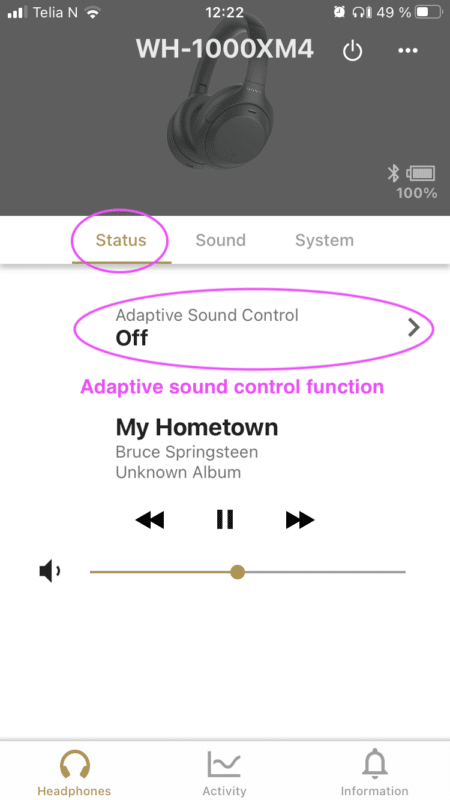
1. Adaptive sound control
This setting will automatially switch headphone settings such as how to mix in the ambient sound.
Set the switch to OFF
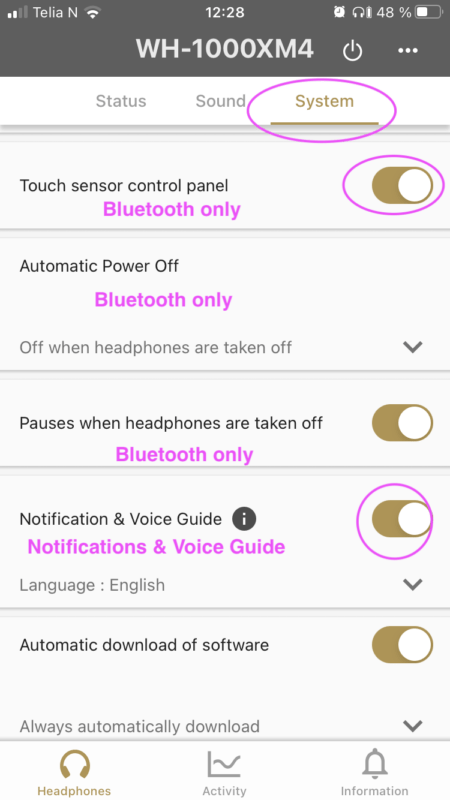
2. Automatic Power Off
This feature is working in Bluetooth mode only.
It turnes the headphones off when they not been used ‘for some time’.
Set to ‘Off when headphones are taken off’.
3. Notification & Voice guide
Gives you some notifications messages on the status on the XM4.
Switch to ON
4. Touch sensor control panel
This function works when the XM4 is connected to your phone via Bluetooth only.
When the Avee is connected, the Bluetooth in the XM4 is switched off, and the touch sensor control panel is not operational.
Switch to ON or OFF
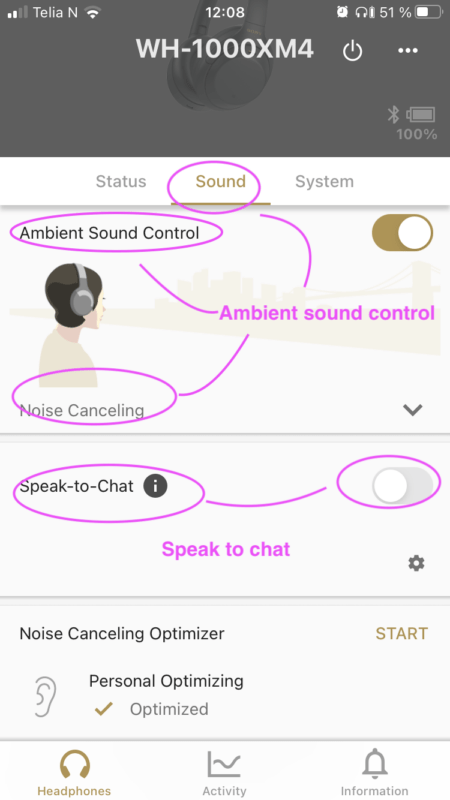
5. Ambient sound control
The Ambient sound control – controls how you hear ambient sound.
Set the Ambient Sound Control to on – and the Noise Cancelling slider to Noise Cancelling. If you set this slider to Abient Sound 1-20, you will get the ambient audio from the cockpit in the headset.
Set to On – and slider to Noise Cancelling
6. Speak to chat
This function disables the ANR when you start to talk, and it disconnects the audio from the Avee into the XM4.
It is crucial that this feature is turned off.
Turn OFF !!!
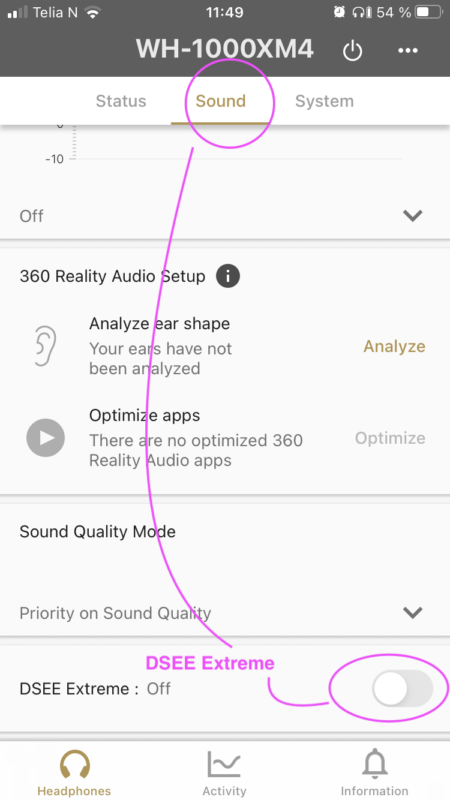
7. DSEE Extreme function
DSEE Extreme uses AI technology to reproduce with high accuracy the frequency responses of the original sound source lost during compression.
We believe this funtion is active in Bluetooth mode only.
Turn OFF
The Bose® QC45 – updated info
The
Bose® QC45
A couple of weeks ago we received the Bose® QC45 headsets, and frankly we were thrilled about it. And we still are.
As weird as it might sound we are so incredibly happy that almost nothing has changed on the new QC45 compared to the older QC35.
The QC35 has been – and still is – our favourite. And the Avee Aviation microphone made for it is for sure our best seller.
And the reason for this is the simplicity of the QC35.
What is new ?
-
- On the QC45, Bose has kept the mechanical on/off/pair switch on the right earcup.
Holy moly how happy we are for this decision from Bose.- This means it is extremely easy to operate even for the least technical of us.
- If you forget to turn the headset on before putting it on, you turn it safely on in a second.
And you get that tactile feel for if it is on or off.
- No (or almost no) additional non-needed features and hard-to-find-and-understand-buttons are added.
- The ANR is excellent – as it is on the QC35 and the Bose 700.
- The comfort is ‘best in class’.
- The QC45 together with the Avee for the QC45 gives you what is needed for an aviation headset!
The best Aviation headset ever !?
- On the QC45, Bose has kept the mechanical on/off/pair switch on the right earcup.
So what has changed from the QC35 to the QC45?
Basically four minor things have changed from the QC35:
- The charging connector has changed from a micro USB connector to a C type USB connector.
- When connected to the Avee, the QC45 has a built in volume control. The volume is adjusted by pressing the +/- keys on the QC45 headset.
On the Avee for the QC35, the volume is adjusted from the Avee volume knob. - Bose claim the battery life is some 5-10% better on the QC45 than on the QC35.
- The physical design on the QC45 has some subtile changes compared to the QC35.
Unfortunately this means you can not (say again:can not) use the Avee for the QC35 on the QC45. It does not fit.
Tests in our DA-40D aircraft
Quck tests in our Diamond DA-40D shows that the QC45 works like a breeze as an aviation headset.
It feels like the QC35, it looks like the QC35; but it is a QC45.
We are before Christmas setting up a full scale ANR test of all the headsets we support. And we will even include the good old A20 headset.
That will be interesting.
When is the Avee for the QC45 coming
Our plan is to release the Avee for the QC45 before Christmas this year.
Untill then
The QC35 is extremely affordable at the moment. It is on sale in most stores – and it will be for months to come.
Purchasing the QC35 now for use as an aviation headset is therefore our advice – if you do not want to wait for the Avee for the QC45 to arrive.
Upgrade kits available
The New Avee700
The new
Avee700 NG vs the Avee700
During the four years since Avee started shipping aviation microphones, we have constantly been improving our product.
The angled connector on the aircraft connector cable to the Avee casing (2019), the cevlar enforced cable – and the new more sturdy microphone (fall 2020) are examples of that.
When Sony® released the WH1000XM3 we developed an Avee aviation microphone supporting that model – and we did the same when Bose® released the Bose® 700.
The Avee for the Bose® 700 is getting more and more popular. The comfort is excellent and the noise cancelling – the ANR – is simply best in class.
This is the reason for coming up with the new and improved aviation microphone for the Bose® 700: The Avee700 NG
What is changed on the newAvee700 NG
On the Avee700 NG (shipping starting end of March 2021) we have done a few changes from the Avee700 prior to this date (referred to here as the Avee700 legacy version).
Microphone output level
On the Avee700 legacy version, the microphone output level was adjusted using the volume pushbuttons on the bottome side of the case. A procedure was need to set the output volume.
On the new Avee700 NG, the microphone output level is set by using a potentiometer on the under-side of the Avee. Your finger nail or the corner of a creditcard is used to set the level.
Mono / stereo settings
On the Avee700 NG the mono/stereo functionality is set with a separate manual rotary switch. The same finger nail or credit card corner can be used to set mono or stereo functionality.
 Avee700 (pre March 2021)

Avee700 NG
LED indicator
Whenever the Avee700 NG is plugged into the aircraft and receives bias voltage (the aircraft avionics is turned on), a steady discrete led is lit on the Avee to indicate that it is operational.
This is a new feature.
The new rugged microphone boom
All Avee microphones are shipped with the new rugged microphone boom which is available in two different lengths: 145mm (standard) and 165mm.
The New Avee35
The new
Avee35 NG vs the Avee335
During the four years since Avee started shipping aviation microphones, we have constantly been improving our product.
The angled connector on the aircraft connector cable to the Avee casing (2019), the kevlar enforced cable – and the new more sturdy microphone (fall 2020) are examples of that.
When Sony® released the WH1000XM3 we developed an Avee aviation microphone supporting that model – and we did the same when Bose® released the Bose 700.
The Bose® QC35® has been an incredible good product – and even if Bose® has released the Bose® 700, the QC35® is our bestseller.
The QC35® is extremely easy use with the mechanical on/off button on the right earcup.
And if you ask us – that is all you need: to be able to switch the thing on and off – and forget about other not needed and never used features.
The ANR – the noise reduction on the QC35® is more than sufficient – and combined with a tremendous value for money – the QC35® is an excellent choice for both professional and private pilots – end even for back seaters.
And this is the reason for coming up with the new and improved aviation microphone for the Bose® QC35: The Avee35 NG
What is changed on the new Avee35 NG
On the Avee35 NG (shipping starting medio March 2021) we have done a number of changes from the Avee335 prior to this date (referred to here as the Avee35 legacy version).
The magnetic stripe – four magnets
On the Avee35 NG four magnets evenly spread on the surface between the headset and the Avee microphone, makes sure it is attached firmly to the headset at all times.
The four magnets is a solution we first used on the Avee for the Bose® 700, and this has proven to be a good choice.
Less physical size
The fact that four magnets are used, means we can use magnets that have a smaller physial size than the two magnets we used on the Avee35 legacy version – giving a smaller physical size on the microphone itself.
The height of the microphone casing is reduced by some 11%.
 Avee335 (pre March 2021)

Avee35 NG
The volume adjustment
On the Avee35 legacy version, the headphone volume was adjusted using push buttons on the bottom side of the Avee microphone casing.
This solution was relatively complicated and required fairly cunning electronics inside the Avee.
On the Avee35 NG we have redesigned the electronics inside the Avee to be completely analog, and the volume adjustments is now done with a dual channel potentiometer on the bottom side of the unit.
For many (or even most) pilots, the volume adjustment on the headphones is rarely used due to the fat that many aircrafts now have individual volume level adjustments for left and right seat. But on smaller aircrafts this adjustment is limited to intercom only – while the radio output level is common to both left and right seat.
In smaller GA aircrafts, the back seats do often not have individual volume adjustment possibility.
Having a good possibility to set the initial speaker level is therefor very important.
 Avee335 (pre March 2021)

Avee35 NG
Microphone output level
On the Avee35 legacy version, the microphone output level was adjusted using the volume pushbuttons on the bottome side of the case. A procedure was need to set the output volume.
On the new Avee35 NG, the microphone output level is set by using a potentiometer on the under-side of the Avee. Your finger nail or the corner of a creditcard is used to set the level.
Mono / stereo settings
On the Avee35 NG the mono/stereo functionality is set with a separate manual switch. The same finger nail or credit card corner can be used to set.
 Avee335(pre March 2021)

Avee35 NG
Connector to the Avee microphone
All Avee aviation microphones are connected to the aircraft using an aircrat interface cable.
This cable is plugged into the Avee microphone in the headset end, and to the aircraft in the aircraft end. A range of aircraft conenctors are offered.
There are no interfaces or boxes on this cable – the electronics is built into the Avee microphone.
LED indicator
Whenever the Avee35 NG is plugged into the aircraft and receives bias voltage (the aircraft avionics is turned on), a steady discrete led is lit on the Avee to indicate that it is operational.
This is a new feature.
The new rugged microphone boom
All Avee microphones are shipped with the new rugged microphone boom which is available in two different lengths: 145mm (standard) and 165mm.